调度器设计文档
用户管理的定时任务系统,让 Agent 能按计划执行周期性任务。基于 APScheduler 实现,Job 持久化到 SQLite,重启后自动恢复。
注意:与系统内部的心跳机制(
heartbeat.py)不同,Scheduler 管理的是用户主动创建的业务任务(定时提醒、定期汇报等)。两者独立运行,互不干扰。→ 详见 heartbeat.md
架构
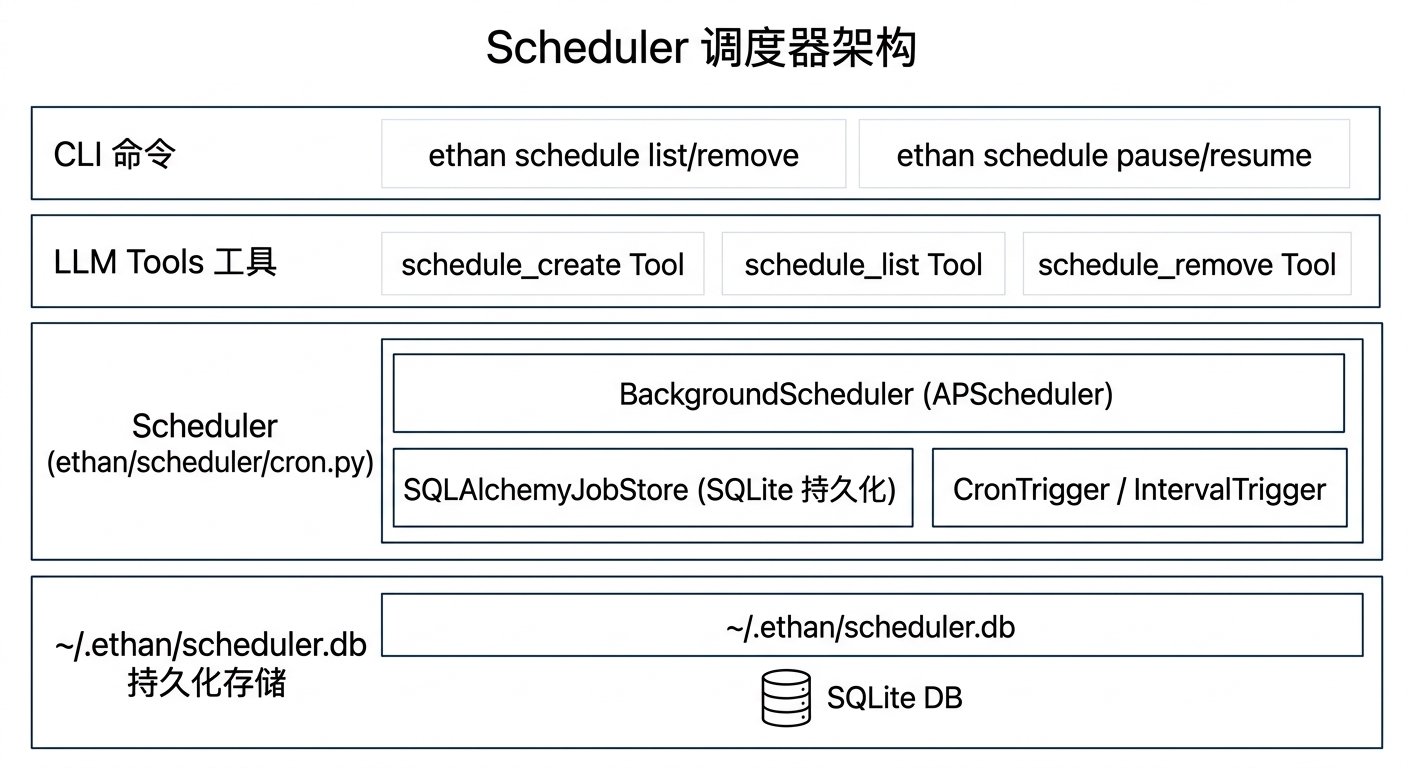
两种调度模式
Cron(定时)
标准 5 段 cron 表达式:分 时 日 月 周
# 常用示例
0 9 * * *       每天 9:00
0 9 * * 1-5     工作日 9:00
30 8,20 * * *   每天 8:30 和 20:30
0 */4 * * *     每 4 小时整点
0 10 * * 1      每周一 10:00
0 0 1 * *       每月 1 日 0:00
Interval(间隔)
Agent 自主创建任务
用户直接描述需求,LLM 通过 schedule_create 工具自动创建:
用户:"每天早上 9 点提醒我查看今日任务"

LLM 调用:
schedule_create(
    job_id="morning-checklist",
    prompt="查看今日任务清单,列出优先级最高的 3 件事",
    cron="0 9 * * *"
)
用户:"每 30 分钟提醒我喝水"

LLM 调用:
schedule_create(
    job_id="water-reminder",
    prompt="提醒用户喝水,发一条鼓励的话",
    interval_minutes=30
)
任务触发时,系统以 prompt 为输入创建一个独立 Agent 实例执行,结果保存在专属的 [定时] <job_id> Session 中,可在 Web UI 的「定时任务」页查看历史执行记录。
如果配置了飞书渠道且设置了主会话(config.lark.main_chat_id),可以在 prompt 里要求 Agent 把结果通知到飞书。Agent 通过 shell 工具调用 Python 脚本,或未来直接调用通知工具实现。
从代码直接推送飞书通知(适合定时任务回调):
import asyncio
from ethan.interface.lark_events import send_lark_notification
from ethan.core.config import get_config

chat_id = getattr(getattr(get_config(), "lark", None), "main_chat_id", "") or ""
if chat_id:
    asyncio.run(send_lark_notification(chat_id, result_text))
send_lark_notification 把 markdown 文本转为飞书 post 气泡(非卡片),支持加粗、斜体、行内代码、链接、无序列表、引用、分隔线。适合一次性发送完整结果,不需要流式编辑。
参数说明
schedule_create 工具参数:
| 参数 | 类型 | 必填 | 说明 |
|---|---|---|---|
job_id |
string | 是 | 唯一任务 ID,用于后续管理 |
prompt |
string | 是 | 任务触发时发给 Agent 的完整指令 |
cron |
string | 二选一 | 5 段 cron 表达式 |
interval_minutes |
int | 二选一 | 每 N 分钟执行一次 |
cron 和 interval_minutes 必须且只能填一个。
持久化
使用 SQLAlchemy + SQLite(~/.ethan/scheduler.db)。APScheduler 的 SQLAlchemyJobStore 序列化 Job 到数据库,ethan serve 启动时自动恢复所有 pending jobs,无需用户手动重建。
CLI 命令
ethan schedule list              # 列出所有任务(含下次执行时间)
ethan schedule remove <id>       # 删除任务
ethan schedule pause <id>        # 暂停(保留记录,不执行)
ethan schedule resume <id>       # 恢复暂停的任务
Web UI 的 /schedule 页面提供相同操作,额外显示上次执行时间和执行结果摘要。
与 Scheduler 的关系
| 维度 | Scheduler(本文档) | Heartbeat(heartbeat.md) |
|---|---|---|
| 创建方式 | 用户通过对话或 CLI 主动创建 | 系统自动运行,不暴露给用户管理 |
| 任务内容 | 任意用户业务任务(提醒、报告等) | facts 去重 + heartbeat.md 周期任务 |
| 持久化 | ~/.ethan/scheduler.db |
不持久化,随服务重启 |
| 可见性 | Web UI /schedule 页面可见 |
不在调度器页面显示 |
| 渠道记录 | 保存执行来源 source="scheduler" |
保存到 [心跳] System Session |